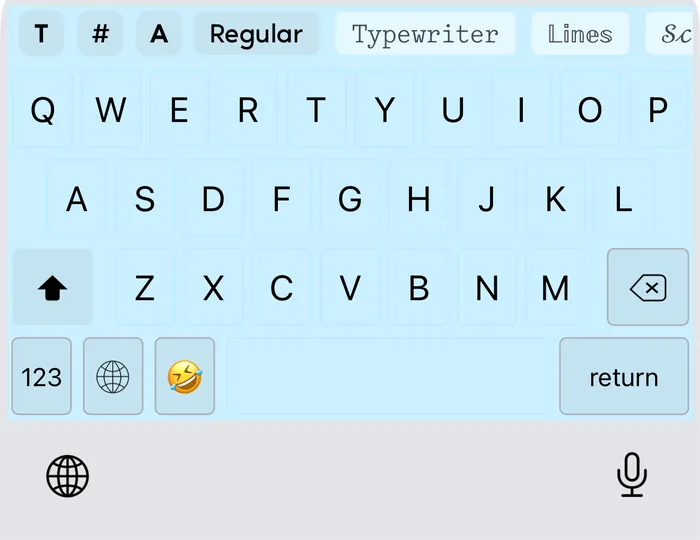
The same styles, right in your keyboard

Keyboard for iPhone and iPadTry the generator ↓

No need to come back to a website for every message. Fonts & Tags adds the styles, your saved texts and tags, and your own keyboard look to the keyboard on iPhone and iPad.

Download on the App Store
Demo: the keyboard look changes to show themes

The demo shows the Fonts & Tags keyboard on photo backgrounds while phrases are typed in the Lines, Script Bold, Gothic and Filled Square styles, next to a kaomoji and a photo turned into text art.

The styles in the demo are real Unicode text, the same the keyboard types.

Font generator: copy and paste fancy text

Type a phrase, pick a style and copy it. The same styles live in the Fonts & Tags keyboard.

12 / 20
Up to 20 characters
  • Script BoldIn keyboard
    𝓕𝓸𝓷𝓽𝓼 & 𝓣𝓪𝓰𝓼
  • Serif BoldIn keyboard
    𝐅𝐨𝐧𝐭𝐬 & 𝐓𝐚𝐠𝐬
  • GothicIn keyboard
    𝔉𝔬𝔫𝔱𝔰 & 𝔗𝔞𝔤𝔰
  • CirclesIn keyboardAny alphabet
    Ⓕⓞⓝⓣⓢ & Ⓣⓐⓖⓢ
  • Small CapsIn keyboard
    Fᴏɴᴛꜱ & Tᴀɢꜱ
  • TypewriterIn keyboard
    𝙵𝚘𝚗𝚝𝚜 & 𝚃𝚊𝚐𝚜
  • Sans BoldIn keyboard
    𝗙𝗼𝗻𝘁𝘀 & 𝗧𝗮𝗴𝘀
  • ScriptIn keyboard
    ℱℴ𝓃𝓉𝓈 & 𝒯𝒶ℊ𝓈
  • Gothic BoldIn keyboard
    𝕱𝖔𝖓𝖙𝖘 & 𝕿𝖆𝖌𝖘
  • LinesIn keyboard
    𝔽𝕠𝕟𝕥𝕤 & 𝕋𝕒𝕘𝕤
  • Serif Cursive BoldIn keyboard
    𝑭𝒐𝒏𝒕𝒔 & 𝑻𝒂𝒈𝒔
  • Sans Bold CursiveIn keyboard
    𝙁𝙤𝙣𝙩𝙨 & 𝙏𝙖𝙜𝙨
  • Serif CursiveIn keyboard
    𝐹𝑜𝑛𝑡𝑠 & 𝑇𝑎𝑔𝑠
  • Sans CursiveIn keyboard
    𝘍𝘰𝘯𝘵𝘴 & 𝘛𝘢𝘨𝘴
  • SansIn keyboard
    𝖥𝗈𝗇𝗍𝗌 & 𝖳𝖺𝗀𝗌
  • Filled CirclesIn keyboard
    🅕🅞🅝🅣🅢 & 🅣🅐🅖🅢
  • SquareIn keyboardAny alphabet
    🄵🄾🄽🅃🅂 & 🅃🄰🄶🅂
  • Filled SquareIn keyboard
    🅵🅾🅽🆃🆂 & 🆃🅰🅶🆂
  • TinyIn keyboard
    ᶠᵒⁿᵗˢ & ᵀᵃᵍˢ
  • Wide
    Fonts & Tags
  • Upside Down
    sƃɐꓕ ⅋ sʇuoℲ
  • InvertIn keyboard
    Ⅎouʇs & ꓕɐƃs
  • StrikethroughIn keyboardAny alphabet
    F̶o̶n̶t̶s̶ &̶ T̶a̶g̶s̶
  • UnderlineIn keyboardAny alphabet
    F͟o͟n͟t͟s͟ &͟ T͟a͟gs͟
  • Double LineIn keyboardAny alphabet
    F̳o̳n̳t̳s̳ &̳ T̳a̳g̳s̳
  • Line AboveIn keyboardAny alphabet
    F̅o̅n̅t̅s̅ &̅ T̅a̅g̅s̅
  • SlashIn keyboardAny alphabet
    F̷o̷n̷t̷s̷ &̷ T̷a̷g̷s̷
  • Short StrikeAny alphabet
    F̵o̵n̵t̵s̵ &̵ T̵a̵g̵s̵
  • Tilde StrikeAny alphabet
    F̴o̴n̴t̴s̴ &̴ T̴a̴g̴s̴
  • Circle FrameIn keyboard (RU/UK)Any alphabet
    F⃝o⃝n⃝t⃝s⃝ &⃝ T⃝a⃝g⃝s⃝
  • Square FrameIn keyboard (RU/UK)Any alphabet
    F⃞o⃞n⃞t⃞s⃞ &⃞ T⃞a⃞g⃞s⃞
  • BubblesIn keyboardAny alphabet
    F̥ͦo̥ͦn̥ͦt̥ͦs̥ͦ &̥ͦ T̥ͦḁͦg̥ͦs̥ͦ
  • CloudsIn keyboardAny alphabet
    F͜͡o͜͡n͜͡t͜͡s͜͡ &͜͡ T͜͡a͜͡g͜͡s͜͡
  • RaysIn keyboardAny alphabet
    F҉o҉n҉t҉s҉ &҉ T҉a҉g҉s҉
  • BirdsIn keyboardAny alphabet
    F҈o҈n҈t҈s҈ &҈ T҈a҈g҈s҈
  • DotsIn keyboardAny alphabet
    F⃨o⃨n⃨t⃨s⃨ &⃨ T⃨a⃨g⃨s⃨
  • StopIn keyboardAny alphabet
    F⃠o⃠n⃠t⃠s⃠ &⃠ T⃠a⃠g⃠s⃠
  • ArrowsIn keyboardAny alphabet
    F͎o͎n͎t͎s͎ &͎ T͎a͎g͎s͎
  • StinkyIn keyboardAny alphabet
    F̾o̾n̾t̾s̾ &̾ T̾a̾g̾s̾
  • SkylineIn keyboardAny alphabet
    F̺͆o̺͆n̺͆t̺͆s̺͆ &̺͆ T̺͆a̺͆g̺͆s̺͆
  • HappyIn keyboardAny alphabet
    F̆̈ŏ̈n̆̈t̆̈s̆̈ &̆̈ T̆̈ă̈ğ̈s̆̈
  • SadIn keyboardAny alphabet
    F̑̈ȏ̈n̑̈t̑̈s̑̈ &̑̈ T̑̈ȃ̈g̑̈s̑̈
  • GlitchIn keyboard (RU/UK)Any alphabet
    F̸̤ͤo͎ͯ̀ň̸̤ṭͥ̀s͚ͭ̕ & T̖ͧ́ả̴̚g̶̦̿s͐͏̣
  • Glitch BelowIn keyboard (RU/UK)Any alphabet
    F̢͈̤ọ̬͎n̡̤̤t͉̭̣s͚̥͚ & T͎̯̖a̞̗̚g̬̞̦s̺͙̣
  • Glitch AboveIn keyboard (RU/UK)Any alphabet
    Fͤ̎̐oͯ̿ͧň̏̐tͥ̀ͯsͭ̑ͮ & Tͧ̓̀ả́̄g̿̉̒s͐ͬͯ
  • Heavy GlitchAny alphabet
    Fͤ̎̐̀͏͓̘̻̲ọ̻̰ͯ̿ͧ͆̀ͅň͔͉̣͕̏̐͋́t̡͈̖ͥ̀ͯ̉̕̚s̳̣̠ͭ̑ͮͥ̀̚ & T̵̙̙̖̝ͧ̓̀͌ả̧̼̥̝͕́̄͌g̷̥̜͓͚̿̉̒̕s̢̺̯̣͕͐ͬͯͨ
  • ComicIn keyboard
    チσɳセᔕ & セαցᔕ
  • FutuIn keyboard
    ᖴᓍᘉᖶS & ᖶᗩᘜS
  • RunesIn keyboard
    ቻዐክፕነ & ፕልኗነ
  • LadybugIn keyboard
    ꎇꂦꈤ꓄ꌗ & ꓄ꍏꁅꌗ
  • MangaIn keyboard
    千ㄖ几ㄒ丂 & ㄒ卂Ꮆ丂
  • AnjaluciaIn keyboard
    ᠻꪮꪀ𝓽ട & 𝓽ꪖᧁട
  • Dots-SquareIn keyboard
    🇫‌🇴‌🇳‌🇹‌🇸 & 🇹‌🇦‌🇬‌🇸
  • Double textIn keyboard
    Foͦnᴛⷮs͛ & Tⷮaͣgs͛

A familiar look. A new way to work.

On iPhone you can choose the Classic or the new interface. On iPad the app uses the new interface with a sidebar.

iPhone

Classic interface

Soft raised surfaces and the navigation you know from earlier versions. Your styles, themes and saved texts are the same in both interfaces.
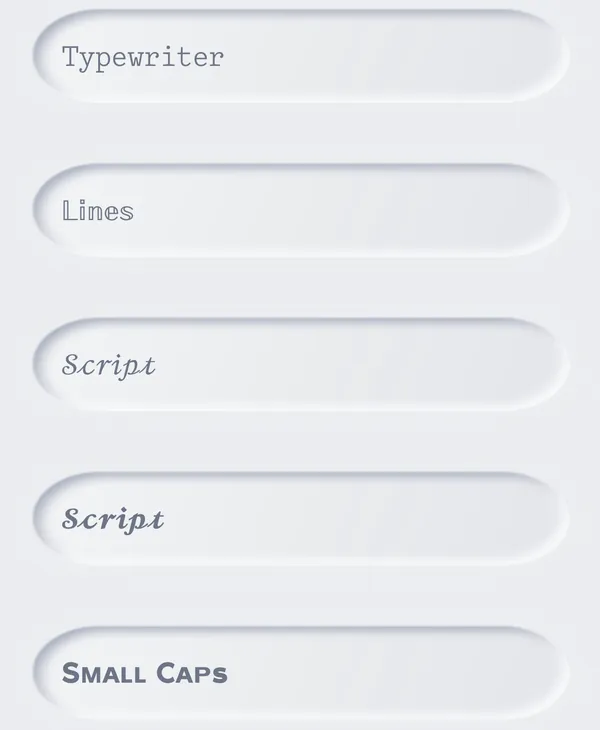
Classic interface on iPhone: font styles Typewriter, Lines, Script and Small Caps on soft raised buttons
iPhone · Classic
iPhoneiPad

New interface

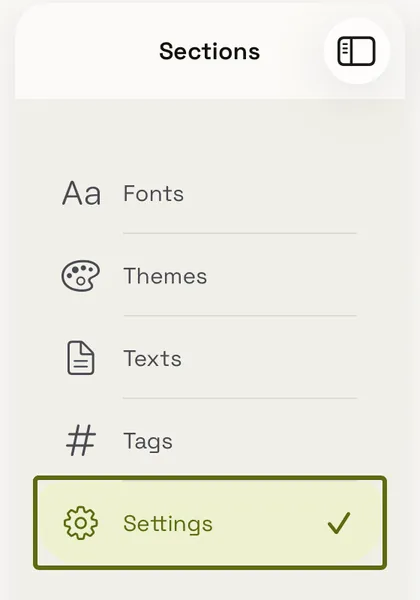
Fonts, themes, texts, tags and settings in one tab bar, with a choice of colour palettes and light or dark appearance. On iPad the sections sit in a sidebar next to the content.
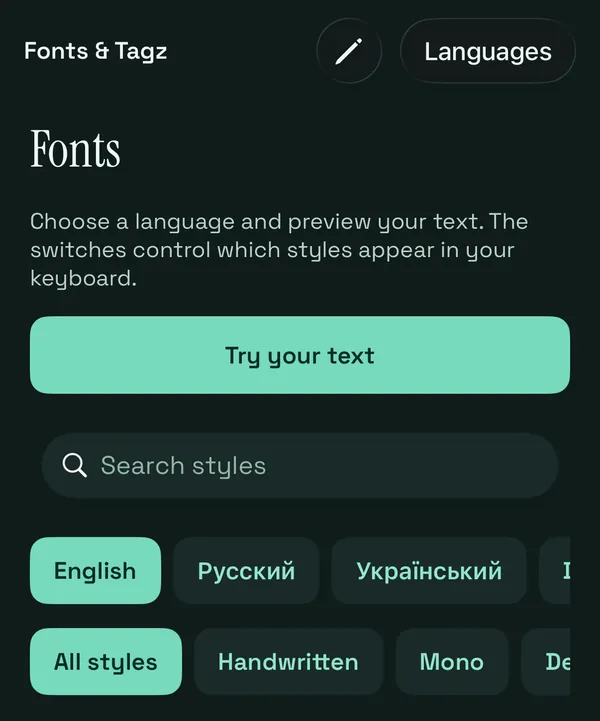
New interface on iPhone: the Fonts screen with a style search and language filters
iPhone · New interface
New interface on iPad: the sidebar with Fonts, Themes, Texts, Tags and Settings
iPad · New interface

Made for iPhone and iPad

iPhone

The Fonts & Tags keyboard on iPhone with a bar of styles above the letters
iPhone · Keyboard
  • Type on the go with the familiar keyboard layout.
  • A style bar above the letters: switch styles as you type.
  • Choose the Classic or the new interface in the app.

iPad

  • A keyboard layout that adapts to the available width.
  • The app's libraries in a sidebar next to your content.
  • The same styles, themes, texts and tags as on iPhone.

What else Fonts & Tags can do

Text styles

44 styles for English, French, German, Italian and Spanish layouts and 21 for Russian and Ukrainian. Every letter is a Unicode character, so the text stays styled wherever you paste it.

Try the font generator →
Script Bold𝓖𝓸𝓸𝓭 𝓲𝓭𝓮𝓪𝓼
Gothic Bold𝕲𝖔𝖔𝖉 𝖎𝖉𝖊𝖆𝖘
CirclesⒼⓞⓞⓓ ⓘⓓⓔⓐⓢ
StrikethroughG̶o̶o̶d̶ i̶d̶e̶a̶s̶

Kaomoji and symbols

A panel of kaomoji, symbols and Egyptian hieroglyphs: bears ʕ•ᴥ•ʔ, lenny faces, cute faces, zodiac signs, frames and more. Search helps you find the right emoji.

Browse kaomoji →
ʕ•ᴥ•ʔ( ͡° ͜ʖ ͡°)(✿╹◡╹)ฅ^•ﻌ•^ฅ♈︎꧁ꕥ꧂𓃒𓅓

Your own keyboard

Pick colours, gradients or a photo for the background, then set up keys, borders and shadows, with separate light and dark versions. Save several designs and switch between them in one tap.
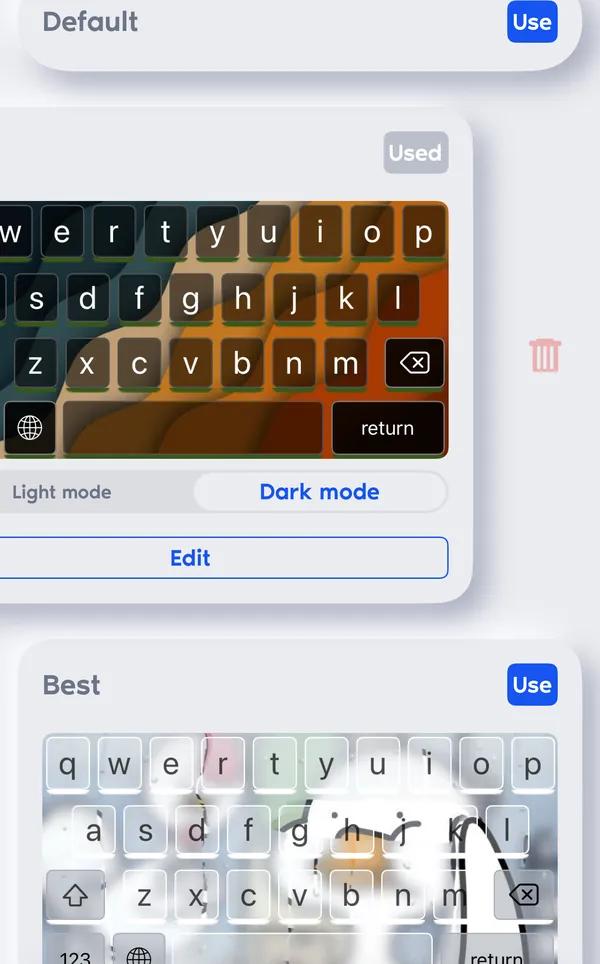
Keyboard designer with saved keyboard themes on photo backgrounds
Keyboard themes

Texts and tags

Save phrases, replies and hashtag sets in the app and insert them from the keyboard in one tap, without switching apps.
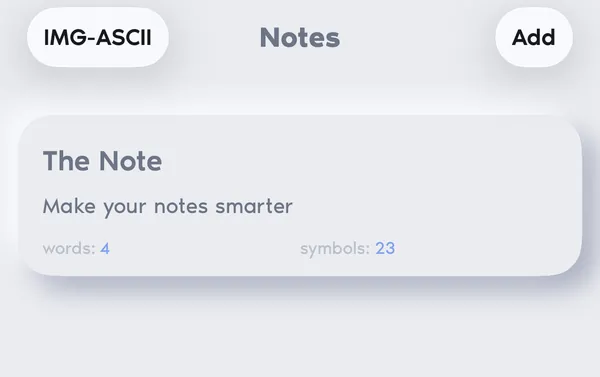
A saved note in the texts library of the app
Saved texts

Photo to text art

Turn a photo into a picture drawn with Braille characters and set how many characters wide it should be. Copy the result or share it anywhere.

Try it in your browser →
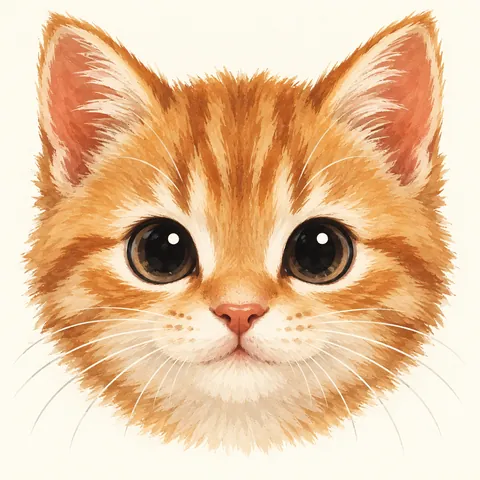
Source photo: a ginger kitten

Start in three steps

  1. Install the app

    Download Fonts & Tags from the App Store on your iPhone or iPad.

  2. Add the keyboard

    Open Settings → General → Keyboard → Keyboards → Add New Keyboard and choose Fonts & Tags.

  3. Switch to it

    In any text field, touch and hold the globe key and pick Fonts & Tags.

How fancy text works

The styles on this page are not fonts in the usual sense. Unicode, the standard every phone and computer uses for text, includes whole alphabets of special letters: mathematical bold and script, letters in circles and squares, small capitals, and marks that draw lines through or under a letter. The generator swaps each letter of your text for its styled twin, so what you copy is still text.

That is why the result survives copy and paste into a bio, a caption, a comment or a chat, where you cannot pick a font. It also means the look depends on the fonts of the device that shows the text: the same letters can look slightly different on iPhone and on Windows.

Where to use it

Fancy text works best in short places that should stand out: an Instagram or TikTok bio, a name, a gaming nickname, a Discord status, a heading in a post. For long text, keep plain letters: styled characters are harder to read, and screen readers used by blind people may read them letter by letter or skip them.

Other alphabets

Most letter styles cover only A–Z and digits. Styles that add marks to letters, such as strikethrough, underline, dots, frames and glitch, work with Cyrillic, Greek and other alphabets. The generator shows a note when some letters of your text stay plain.

Questions

How do I copy and paste fancy text?

Type your text in the box, find a style you like and press Copy. Then open Instagram, TikTok, a chat or any other app, tap the text field and choose Paste. The styled letters are ordinary Unicode characters, so they stay styled after pasting.

Why do some letters look like empty boxes?

The app or device you paste into has no font with that character. Most styles work on current iPhone, Android, Mac and Windows systems, but older devices and some games show boxes or question marks. Try another style or check how the text looks before you publish it.

Why does my Russian or Ukrainian text stay plain in some styles?

Bold, cursive, gothic, bubble and most other letter styles exist in Unicode only for the Latin alphabet and digits. Styles that add lines, dots or frames to each letter work with any alphabet. Choose the Cyrillic filter to see them.

Is the font generator free?

Yes. Every style on this site is free to copy, with no sign-up. Fonts & Tags, the keyboard for iPhone and iPad, is free to download from the App Store.

Where does the Fonts & Tags keyboard work?

In the text fields of most apps on iPhone and iPad: messengers, social networks, notes and mail. iOS does not allow third-party keyboards in some fields, such as passwords; there the system keyboard appears instead.

More tools

Fonts & Tags for iPhone and iPad

A keyboard with text styles, kaomoji, your own themes, saved texts and tags, and photo to text art.

Classic interface on iPhone: font styles Typewriter, Lines, Script and Small Caps on soft raised buttons
iPhone · Classic
New interface on iPhone: the Fonts screen with a style search and language filters
iPhone · New interface
New interface on iPad: the sidebar with Fonts, Themes, Texts, Tags and Settings
iPad · New interface
Download on the App Store